Viewing Vulnerabilities
7 min read
Every MCP server in the catalog has been automatically analyzed for security vulnerabilities. When you publish an MCP or browse one in the catalog, MCP Hub runs a comprehensive static analysis covering 14 vulnerability classes. This guide explains how to read the results, understand the scoring system, and interpret the findings.
Navigate to an MCP Detail Page
Open any MCP server in the catalog to view its security analysis. You can get there by browsing the catalog at mcp-hub.info/catalog and clicking on any MCP, or by navigating directly to a URL like mcp-hub.info/mcp/cr0hn/mcp-schrodinger.
The detail page shows all the information about the MCP server: its metadata, security score, findings, and security controls status.
The Security Score
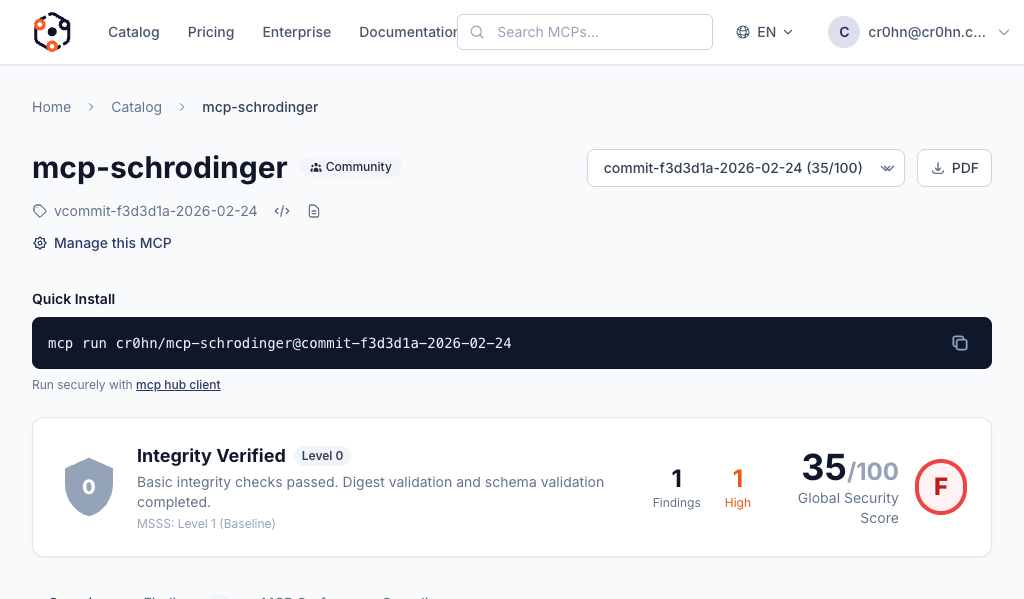
At the top of every MCP detail page, you will find a score gauge showing a number from 0 to 100. This is the overall security score, computed automatically from the analysis results.

The score uses color coding to give you an at-a-glance assessment:
| Color | Score Range | Meaning |
|---|---|---|
| Green | 80 – 100 | Strong security posture. Few or no findings. |
| Yellow | 60 – 79 | Acceptable with some issues. Review findings before use. |
| Orange | 40 – 59 | Significant concerns. Multiple findings that need attention. |
| Red | 0 – 39 | Serious security issues. Not recommended for use without remediation. |
The score is not a simple count of vulnerabilities. It is an aggregate of three weighted components that together represent the overall trustworthiness of the MCP server.
Score Breakdown
The final score is a weighted combination of three categories:
Security (50%)
The largest component of the score. This measures the vulnerabilities found directly in the MCP server’s source code.
- Vulnerability count and severity: How many findings were detected, and how severe they are (Critical, High, Medium, Low).
- Severity distribution: A single Critical finding weighs far more than several Low findings.
- Exploitability: Whether the vulnerability is easily exploitable or requires specific conditions.
Supply Chain (30%)
This measures the health and safety of the MCP server’s dependencies.
- Dependency health: Are dependencies actively maintained? Are there known abandoned packages?
- Known CVEs: Are any dependencies affected by publicly disclosed vulnerabilities?
- Pinned versions: Are dependency versions pinned to specific releases, or do they use floating ranges that could introduce unexpected changes?
Maturity (20%)
This measures code quality signals that correlate with more secure and reliable software.
- Code quality signals: Consistent patterns, proper error handling, input validation.
- Documentation: Whether the MCP server includes usage documentation and API descriptions.
- Testing indicators: Presence of test files and test coverage signals.
Letter Grade
The final numeric score maps to a letter grade for quick reference:
| Grade | Score Range |
|---|---|
| A | 90 – 100 |
| B | 80 – 89 |
| C | 70 – 79 |
| D | 60 – 69 |
| F | Below 60 |
Certification Levels
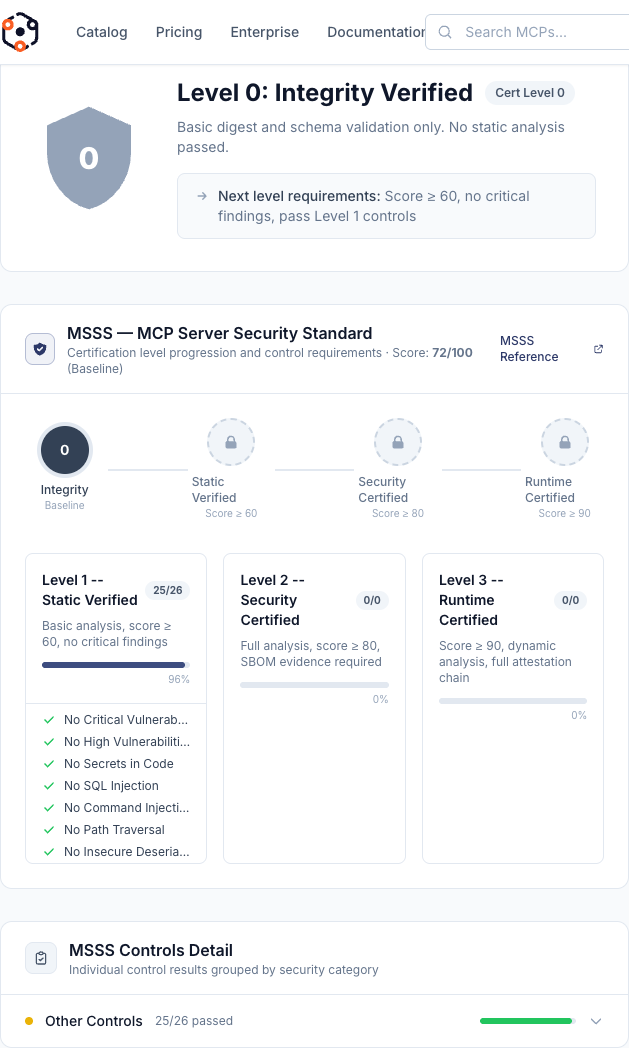
The security score determines the certification level assigned to the MCP server. Certification levels are cumulative – a higher level includes all the guarantees of the levels below it.
Level 0: Integrity Verified
Requirement: Any score
The baseline level. The package has passed digest validation and schema checks. This confirms that the artifact you download is exactly what the publisher submitted – it has not been tampered with in transit or storage.
Level 1: Static Verified
Requirement: Score >= 60
Basic static analysis has been completed and the MCP server passed. No critical vulnerabilities were found during the initial security scan. This level means the MCP server has been reviewed by the automated analysis engine and cleared of the most dangerous issues.
Level 2: Security Certified
Requirement: Score >= 80
Full analysis has been completed with evidence artifacts. Security controls have been verified, and the MCP server comes with attestation data and a Software Bill of Materials (SBOM). This is the recommended minimum level for production use.
Level 3: Runtime Certified
Requirement: Score >= 90
The highest certification level, reserved for future dynamic analysis capabilities. In addition to all static checks, the MCP server will be verified through runtime behavior analysis. This level is not yet available but is planned for a future release.
Findings
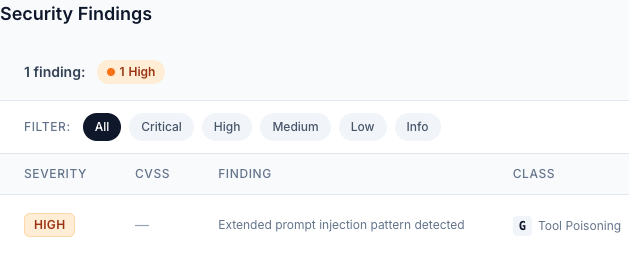
Below the score section, you will find the Findings panel. Findings are the individual security issues discovered during analysis, grouped by severity.
Severity Levels
Findings are organized into four severity levels:
- Critical: Exploitable vulnerabilities that could lead to immediate compromise. These must be fixed before the MCP server can reach certification level 1 or above.
- High: Serious security issues that pose significant risk. These heavily impact the security score.
- Medium: Notable concerns that should be addressed. They indicate potential weaknesses but are not immediately exploitable.
- Low: Minor issues or best-practice recommendations. These have minimal impact on the score but represent opportunities for improvement.
What Each Finding Shows
Every finding includes the following information:
- Vulnerability class: Which of the 14 vulnerability classes this finding belongs to (e.g., Prompt Injection, Data Exfiltration, Privilege Escalation).
- Severity: Critical, High, Medium, or Low.
- Description: A human-readable explanation of what the issue is and why it matters.
- Evidence: The specific code snippet or pattern match that triggered the finding, so you can locate and fix the issue in your source code.
The 14 Vulnerability Classes
MCP Hub’s analysis engine scans for 14 distinct classes of vulnerabilities (labeled A through N):
- Prompt injection – Manipulating LLM behavior through crafted inputs
- Data exfiltration – Unauthorized extraction of sensitive data
- Privilege escalation – Gaining elevated permissions beyond intended scope
- Resource abuse – Excessive consumption of compute, memory, or network resources
- Supply chain attacks – Compromised or malicious dependencies
- Insecure communication – Unencrypted or improperly authenticated connections
- Input validation failures – Missing or insufficient validation of user inputs
- Authentication weaknesses – Flawed or missing authentication mechanisms
- Authorization bypasses – Circumventing access control checks
- Information disclosure – Leaking sensitive information through errors or logs
- Insecure configuration – Default credentials, debug modes, or permissive settings
- Injection vulnerabilities – SQL injection, command injection, and similar attacks
- Cryptographic weaknesses – Use of broken or weak cryptographic algorithms
- Denial of service – Patterns that could be exploited to crash or hang the server
Security Controls
The Security Controls section shows how the MCP server maps against established security frameworks.
OWASP MCP Top 10 Mapping
Each MCP server is evaluated against the OWASP MCP Top 10 security requirements. The controls grid shows each requirement as either:
- Passed (green): The MCP server satisfies this security requirement. Evidence is provided showing why it passed.
- Failed (red): The MCP server does not meet this security requirement. The specific findings that caused the failure are linked.
Understanding the Controls Grid
The controls grid provides a structured view of the MCP server’s security posture:
- Each row represents a security control derived from the OWASP MCP Top 10.
- Controls map to specific security requirements such as input validation, authentication, authorization, and secure communication.
- Clicking on a control reveals the evidence: which analysis checks contributed to the pass or fail status.
- The number of passed vs. failed controls directly influences the Security component of the overall score.
This mapping helps security teams quickly assess whether an MCP server meets their organization’s compliance requirements without reading every individual finding.
For MCP Publishers
If you are the publisher of an MCP server, you can take action to improve your security score.
How to Improve Your Score
- Fix reported findings: Start with Critical and High severity findings. Each fixed finding directly improves your Security score component.
- Pin your dependencies: Use exact version numbers instead of floating ranges. This improves your Supply Chain score.
- Update vulnerable dependencies: If the analysis reports known CVEs in your dependencies, update to patched versions.
- Add tests: The presence of test files and test coverage improves the Maturity component of your score.
- Improve documentation: Add a README, API documentation, and usage examples. This also contributes to the Maturity score.
- Validate all inputs: Ensure every tool input and parameter is properly validated before use.
Re-scan After Changes
After you make improvements to your MCP server’s source code:
- Push your changes to the Git repository linked to your MCP.
- Go to your Dashboard and navigate to My MCPs.
- Click on the MCP you want to re-analyze.
- Click the Rescan button to trigger a fresh analysis with the latest code.
- The analysis pipeline will run again, and your score and findings will be updated within a few minutes.
Your certification level will automatically adjust if your new score crosses a threshold boundary.